

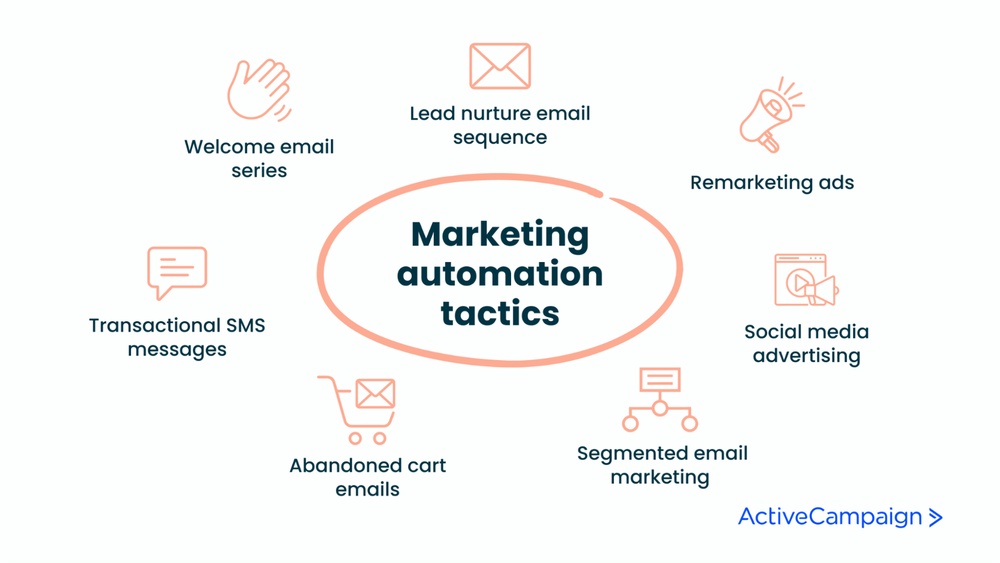
If you want to save time and still connect with your audience in a meaningful way, email marketing automation is your secret weapon. Imagine sending the right message to the right person exactly when they need it—without lifting a finger each time.
That’s what automation does for your emails. It helps you build stronger relationships, boost engagement, and increase sales by delivering personalized emails triggered by specific actions, like signing up or abandoning a cart. But how do you get started without getting overwhelmed? That’s where SendFox comes in. This easy-to-use tool lets you create automated email workflows that work for you around the clock. Whether you want to welcome new subscribers, remind customers about products they left behind, or celebrate special occasions, SendFox handles it effortlessly. Ready to see how email marketing automation can transform your business? Check out SendFox and start automating your emails today: Get SendFox Now. Keep reading to discover how to set up powerful automated campaigns that grow your audience and your revenue.
Introduction To Email Marketing Automation
Email marketing automation is a powerful tool for businesses. It uses software to send targeted emails automatically. These emails are based on triggers, user actions, or scheduled times. Automation saves time and increases customer engagement by sending the right message at the right moment.
This section explains what email marketing automation is, why it matters, and how it helps boost sales and engagement.
What Is Email Marketing Automation?
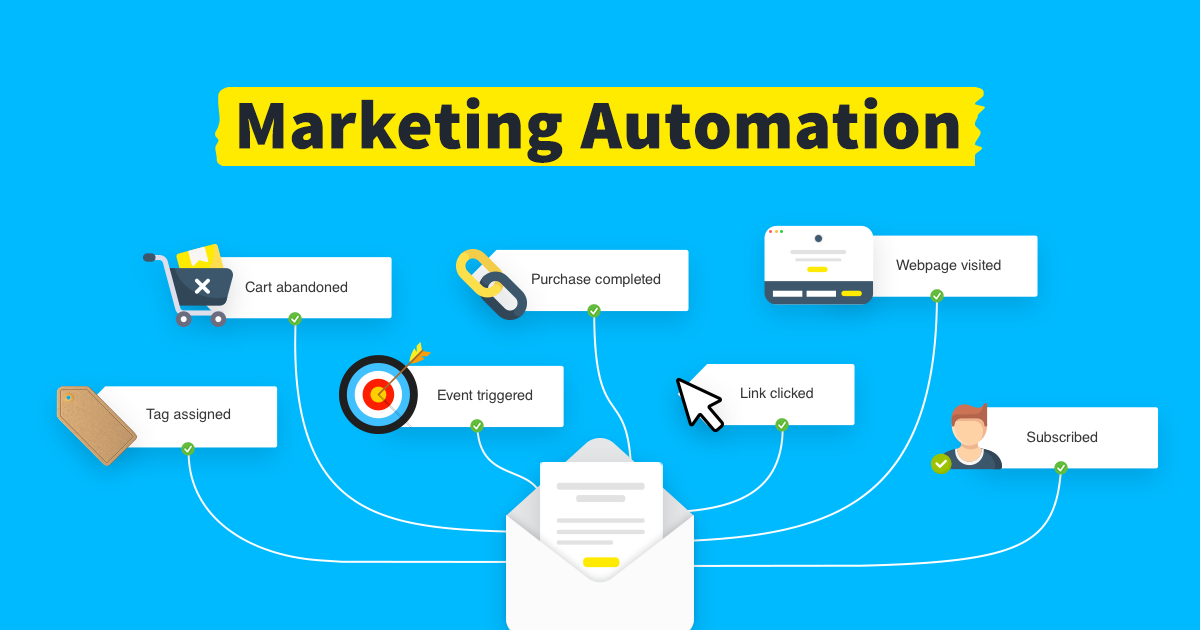
Email marketing automation means using software to send emails without manual work. Emails go out automatically after certain triggers happen. Triggers include events like:
- Someone signs up for a newsletter
- A customer abandons a shopping cart
- A subscriber’s birthday or anniversary
Businesses create workflows, or sequences of emails, that launch after these triggers. Examples include:
- Welcome email series
- Order confirmation messages
- Product feedback requests
- Re-engagement emails for inactive users
This process allows for personalized messages sent at scale, improving communication without extra effort.
The Purpose And Benefits Of Automating Emails
Automating emails helps businesses save time and work more efficiently. Key benefits include:
| Benefit | Description |
|---|---|
| Time-saving | Emails send automatically, reducing manual work. |
| Consistency | Messages reach customers regularly and on time. |
| Personalization | Emails match subscriber behavior and preferences. |
| Improved engagement | Relevant emails increase customer interaction. |
| Higher conversions | Targeted emails help turn leads into customers. |
How Email Automation Enhances Sales And Engagement
Email automation connects with customers at important moments. It sends messages that encourage action. Here’s how it boosts sales and engagement:
- Welcomes new subscribers with friendly, informative emails.
- Recovers lost sales by reminding customers of abandoned carts.
- Builds loyalty through personalized offers and updates.
- Re-engages inactive users to bring them back.
Automation makes emails timely and relevant. This creates a better experience for customers and helps businesses grow.

Credit: www.scoreapp.com
Key Features Of Email Marketing Automation
Email marketing automation simplifies communication by sending emails automatically. It uses software to send targeted messages triggered by specific actions or schedules. This method saves time, boosts engagement, and increases sales. Understanding its key features helps businesses create effective campaigns.
Trigger-based Email Delivery: Timing Your Messages Perfectly
Emails are sent based on specific triggers. These triggers can be:
- Time-based events like birthdays or anniversaries
- User actions such as signing up or abandoning a cart
Automatic sending ensures the message reaches the user at the right moment. This timing improves the chance the email will be opened and acted upon.
Workflow Creation: Designing Seamless Customer Journeys
Workflows are a series of connected emails triggered by user behavior. They guide customers through a journey without manual effort. For example:
- User subscribes to a newsletter
- They receive a welcome email
- Follow-up emails encourage further engagement
Workflows help maintain contact and nurture leads effectively.
Personalization At Scale: Tailoring Messages To Individual Behaviors
Automation uses data to customize emails for each subscriber. It considers:
- Past purchases
- Browsing history
- Preferences and interests
This personalization makes emails more relevant and increases engagement. Sending the right message to the right person feels personal, even if it is automated.
Examples Of Automated Emails And Their Impact
| Type of Automated Email | Description | Impact |
|---|---|---|
| Welcome Email Series | Sent after subscription to greet and introduce the brand. | Builds trust and encourages first purchase. |
| Order Confirmation Emails | Sent after purchase to confirm order details. | Increases customer confidence and satisfaction. |
| Abandoned Cart Emails | Sent when a customer leaves items in their cart without buying. | Recovers lost sales and reminds customers to complete purchase. |
Using tools like SendFox makes setting up these automated emails easy and efficient.
Pricing And Affordability Breakdown
Email marketing automation tools offer different pricing plans. Understanding these plans helps businesses choose the best fit. Pricing depends on features, subscriber limits, and support levels. This section breaks down common pricing models and compares cost with value. It also discusses free versus paid options for diverse business needs.
Common Pricing Models In Email Automation Tools
Email automation tools usually follow these pricing models:
- Subscription-based: Pay a fixed monthly or yearly fee based on subscriber count.
- Pay-as-you-go: Pay per email sent, good for low-volume senders.
- Tiered plans: Different levels offer more features and higher limits at higher prices.
- Freemium model: Free basic plan with limited features, upgrade for full access.
| Pricing Model | Description | Best For |
|---|---|---|
| Subscription-based | Fixed fee per month/year based on subscriber count | Businesses with steady email volume |
| Pay-as-you-go | Payment per email sent | Low-volume or seasonal senders |
| Tiered plans | Multiple plans with increasing features and limits | Growing businesses needing more tools |
| Freemium model | Free basic plan, paid upgrades available | Startups and small businesses |
Cost Vs. Value: Assessing Roi From Automation
Automation saves time by sending emails automatically. This reduces manual work and errors. It helps deliver personalized messages, which improve engagement.
Return on investment (ROI) depends on increased sales and saved resources. Consider these points:
- How much time automation frees up for your team.
- The increase in email open and click rates.
- Growth in customer retention and repeat sales.
- Reduction in customer acquisition costs.
Tools like SendFox offer affordable plans that support these benefits. The key is to balance cost with the value gained in efficiency and revenue.
Free Vs. Paid Options: What Fits Your Business Needs?
Free plans let businesses try automation without risk. They often include basic features and limited subscribers.
Paid plans provide:
- More subscribers and email sends
- Advanced automation workflows
- Better support and analytics
- Integration with other marketing tools
Choose free if you are just starting or have low volume. Opt for paid plans for:
- Growing subscriber lists
- Need for complex automation
- Desire for detailed reporting and support
SendFox offers a simple, budget-friendly paid plan ideal for small businesses. Its pricing fits tight budgets while delivering key automation features.
Credit: www.getresponse.com
Pros And Cons Of Email Marketing Automation
Email marketing automation uses software to send targeted emails automatically. It triggers emails based on user actions, schedules, or behaviors. This method saves time and boosts efficiency. Yet, it has its own set of challenges to consider.
Advantages: Time-saving, Efficiency, And Increased Revenue
Email marketing automation reduces manual work by sending messages automatically. It delivers the right email at the right time using triggers like sign-ups or cart abandonment. This keeps customers engaged without constant oversight.
- Time-Saving: Automates repetitive tasks, freeing marketers for other work.
- Efficiency: Sends personalized emails to many users quickly and accurately.
- Increased Revenue: Encourages purchases through timely reminders and offers.
For example, a welcome email series or abandoned cart notifications encourage users to stay connected and complete purchases. Automation helps maintain consistent communication without delays.
Potential Drawbacks: Over-automation And Deliverability Issues
Too much automation can make emails feel robotic or impersonal. This may reduce customer trust and engagement.
- Over-Automation: Sending too many emails or irrelevant content can annoy subscribers.
- Deliverability Issues: Automated emails risk landing in spam folders if not properly managed.
Careful planning is needed to balance automation with genuine interaction. Monitoring email performance and adjusting workflows is essential to avoid these pitfalls.
Real-world User Experiences And Lessons Learned
Users of tools like SendFox report clear benefits and challenges.
| Experience | Details | Lesson |
|---|---|---|
| Positive | Automated welcome series increased subscriber engagement. | Personalized emails build stronger customer relationships. |
| Challenge | Some emails ended up in spam folders. | Regularly clean email lists and verify sender reputation. |
| Insight | Overloading users with emails led to unsubscribes. | Maintain a balanced email frequency to retain subscribers. |
Learning from real users helps refine email marketing strategies for better results.
Recommendations For Ideal Users And Scenarios
Email marketing automation suits many business types. It helps save time by sending targeted, personalized emails automatically. Choosing the right users and scenarios boosts its impact. Below are key recommendations to guide effective automation use.
Small Businesses Vs. Large Enterprises: Tailoring Automation Use
Small businesses and large enterprises differ in needs and resources. Automation strategies must match these differences.
- Small Businesses benefit from simple workflows like welcome emails and follow-ups.
- They need easy-to-use tools that save time and reduce manual work.
- Large Enterprises require complex automation with multiple triggers and segmentation.
- They handle large email lists and use data to personalize campaigns deeply.
| Aspect | Small Businesses | Large Enterprises |
|---|---|---|
| Workflow Complexity | Simple, few steps | Multi-step, advanced triggers |
| Personalization | Basic (name, purchase) | Advanced (behavior, preferences) |
| Tool Needs | Easy setup, low cost | Robust, scalable |
Ecommerce Applications: Maximizing Sales Through Targeted Emails
Ecommerce businesses gain much from email automation. It drives sales by sending relevant offers and reminders.
- Send abandoned cart emails to recover lost sales.
- Use order confirmations and shipping updates to build trust.
- Offer personalized product recommendations based on browsing or purchase history.
- Run seasonal or special promotions targeting specific customer groups.
Trigger-based emails respond to user actions fast. This keeps customers engaged and encourages repeat purchases.
Best Practices For Beginners: Setting Up Effective Automation Workflows
Beginners should focus on clear, simple workflows that deliver value.
- Start with key triggers: Welcome emails, abandoned cart reminders, or birthday offers.
- Keep messages short and personal. Use subscriber names and relevant content.
- Test workflows regularly. Check open rates and click rates to improve.
- Set clear goals. Know what each email should achieve.
- Use automation tools like SendFox for easy setup and management.
Simple, targeted workflows reduce workload and increase customer engagement effectively.
Credit: www.campaigncreators.com
Frequently Asked Questions
What Is Email Marketing Automation?
Email marketing automation uses software to send targeted emails automatically based on user actions or schedules. It saves time and boosts engagement by delivering personalized messages without manual effort.
How Does Email Marketing Automation Work?
Automation triggers emails based on specific events like sign-ups or cart abandonment. Businesses create workflows to send timely, relevant messages, improving customer communication and conversion rates.
What Are Common Triggers In Email Automation?
Triggers include time-based events like birthdays and event-based actions such as newsletter sign-ups or abandoned shopping carts. These initiate automated email sequences to engage users effectively.
What Are The Main Benefits Of Email Automation?
Email automation saves time, increases efficiency, boosts engagement, and drives revenue. It also improves customer retention by providing consistent, personalized communication at scale.
Conclusion
Email marketing automation helps send the right message at the right time. It saves time by automating routine emails like welcomes or reminders. Personalized emails keep customers interested and boost sales naturally. Setting up workflows allows smooth, consistent communication without extra effort. Tools like SendFox make automation simple and affordable for any business. Start using automation today to improve your email marketing results and build stronger customer connections. Small steps lead to big benefits.
