

Are you tired of spending hours on repetitive, data-heavy tasks that drain your energy and slow down your productivity? Imagine having a powerful tool that can handle those mundane jobs for you, freeing up your time to focus on what really matters.
That’s exactly what Robomotion RPA promises—a smart automation solution designed to simplify your workflow with ease. Whether you’re a startup or a growing business, Robomotion’s user-friendly interface and lifetime pricing make it a standout choice. Ready to discover how this tool can transform your daily routine? Dive into our full Robomotion RPA Review and see why so many users are calling it a game-changer.
Introduction To Robomotion Rpa
Robomotion RPA is a software tool designed to automate repetitive and data-heavy manual tasks. It helps businesses save time and reduce errors by handling routine workflows automatically. This introduction explains what Robomotion RPA is, its role in the automation field, and who benefits most from it.
Overview Of Robomotion Rpa And Its Purpose
Robomotion RPA is a flexible and powerful robotic process automation (RPA) software. It allows users to build automation workflows with an easy-to-use interface. The software handles tasks like data entry, report generation, and file management without human intervention.
The main goal is to replace manual repetitive work with automated processes that run faster and with fewer errors.
How Robomotion Fits Into The Automation Landscape
Robomotion fits well among many RPA tools available today. It offers a simple yet robust solution for automating business processes. Its strong points include:
- Intuitive workflow creation without heavy coding
- Resilient error management to handle failures smoothly
- Compatibility with various data sources and applications
- Scalability to support growing business needs
Compared to some complex RPA platforms, Robomotion emphasizes ease of use and quick deployment.
Target Audience And Use Cases
Robomotion RPA is ideal for small to medium businesses and teams that face repetitive tasks daily. Common users include:
- Data analysts automating report updates
- Customer service teams managing ticket processing
- Finance departments handling invoice data
- IT teams automating system monitoring and alerts
Use cases span industries such as finance, healthcare, retail, and IT. It suits any scenario where manual tasks slow down productivity.
| Industry | Typical Automation Task |
|---|---|
| Finance | Invoice processing and reconciliation |
| Healthcare | Patient data entry and appointment scheduling |
| Retail | Inventory updates and order tracking |
| IT | System alerts and log monitoring |

Credit: www.g2.com
Key Features That Set Robomotion Apart
Robomotion RPA offers a unique blend of features designed to simplify automation for businesses of all sizes. Its design focuses on ease of use, powerful capabilities, and reliable performance. These aspects make it a strong choice for automating repetitive and data-heavy tasks.
User-friendly Interface For Easy Workflow Creation
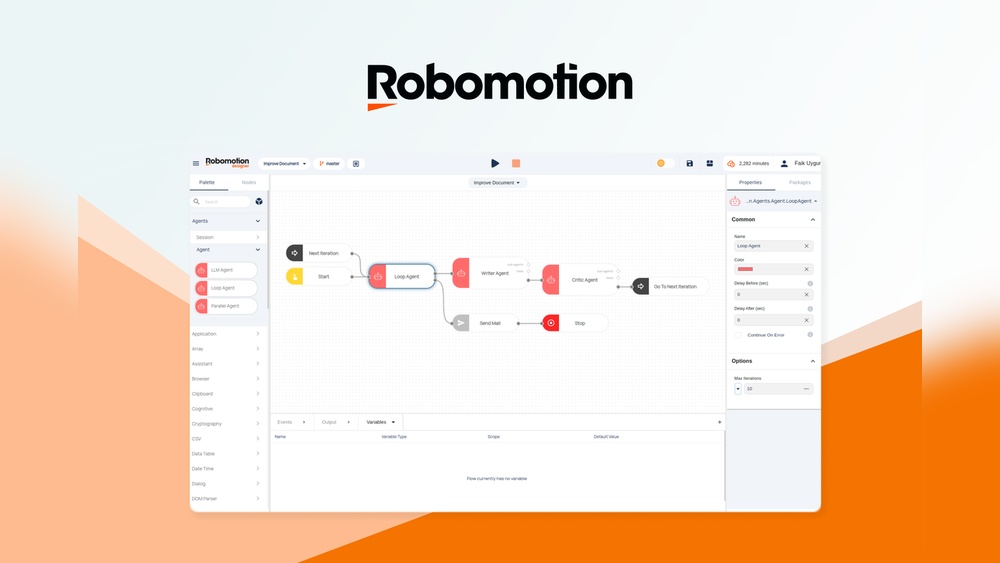
Robomotion’s interface is clear and intuitive. Users can build automation workflows without coding skills. Drag-and-drop tools help create processes quickly. This reduces the learning curve and saves time.
The visual layout shows each step of the workflow. Users can easily modify or expand automation tasks. This flexibility suits both beginners and experienced users.
Powerful Automation Capabilities Across Applications
Robomotion supports a wide range of applications. It works with web browsers, desktop software, and databases. This versatility allows automation across multiple platforms.
- Handles data extraction and entry with precision
- Automates repetitive tasks in CRM, ERP, and email tools
- Supports scheduled and triggered automation runs
The tool adapts to complex workflows, improving efficiency and accuracy.
Resilient Error Management System To Ensure Reliability
Errors happen. Robomotion’s error management system detects issues early. It retries failed steps automatically to keep workflows running smoothly.
Users receive clear alerts about any problems. Logs provide detailed information for troubleshooting. This helps reduce downtime and maintain trust in automation.
Centralized Admin Console For Streamlined Control
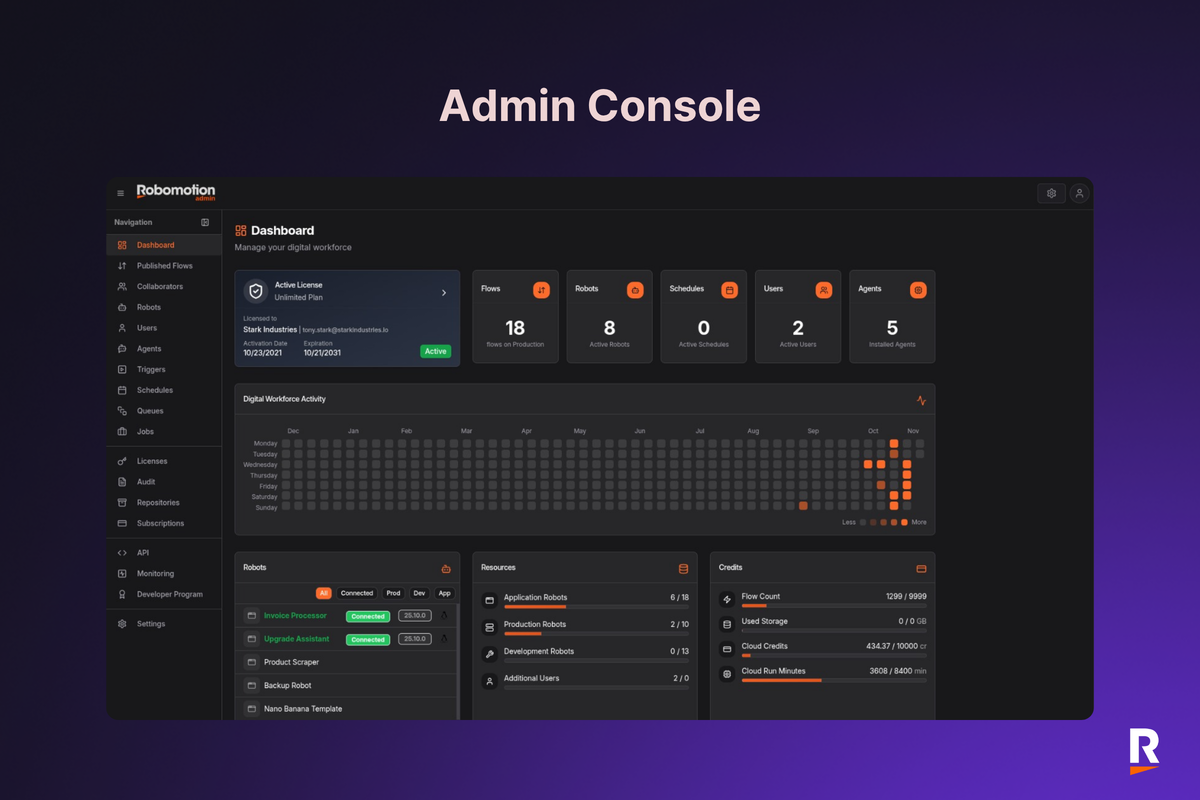
The admin console centralizes control over all robots and workflows. Administrators can monitor performance and manage user access easily.
| Feature | Benefit |
|---|---|
| Robot Management | Deploy and control multiple automation bots |
| Access Control | Assign roles and permissions securely |
| Performance Monitoring | Track workflow status and resource use |
This centralization simplifies governance and improves security.
Integration With Ai And Other Technologies
Robomotion connects with AI tools to enhance automation intelligence. It processes unstructured data using AI-driven methods. This expands automation to tasks involving images, text, and speech.
Integration with APIs and third-party apps broadens its use cases. Businesses can build workflows that combine traditional automation with smart technologies.
These integrations help automate more complex, data-rich processes effectively.
Pricing And Affordability Analysis
Robomotion RPA offers a pricing structure designed for easy access and long-term savings. Its affordability makes it attractive for businesses focusing on automating repetitive tasks without heavy upfront costs. This section examines the pricing model, compares it to other RPA tools, and evaluates its value for startups and SMEs.
Lifetime Pricing Model And Its Benefits
Robomotion RPA uses a lifetime pricing model. Pay once and use the software indefinitely. This eliminates recurring subscription fees.
- One-time payment reduces long-term expenses.
- Users get free updates without extra charges.
- Ideal for businesses aiming for budget predictability.
This model suits companies wanting to avoid monthly or yearly fees. It ensures continuous access and support.
Comparison With Other Rpa Tools On The Market
| RPA Tool | Pricing Model | Starting Price | Subscription Type |
|---|---|---|---|
| Robomotion RPA | Lifetime | $99 (one-time) | No subscription |
| UiPath | Subscription | $420/month | Monthly/Annual |
| Automation Anywhere | Subscription | $750/month | Monthly/Annual |
| Blue Prism | License + Subscription | $1,000+ (license) | Annual maintenance |
Robomotion RPA’s one-time cost offers substantial savings versus monthly or annual fees of competitors. This model suits businesses with limited budgets.
Value For Startups And Small To Medium Enterprises
Startups and SMEs benefit from Robomotion RPA’s pricing in several ways:
- Low upfront cost reduces financial risk.
- Simple pricing avoids confusion and hidden fees.
- Access to automation tools without heavy investment.
- Ability to scale automation as business grows.
This pricing makes automation accessible to smaller businesses. They can focus on growth without worrying about recurring software expenses.
Credit: appsumo.com
Pros And Cons Based On Real-world Usage
Robomotion RPA is praised for its ability to automate repetitive and data-heavy tasks. Users value its flexibility and ease of use. Real-world feedback shows clear strengths and some areas to improve. This section covers key advantages, common challenges, and user support experiences.
Advantages Highlighted By Users And Reviews
- Highly Flexible Automation: Users report Robomotion adapts well to various business processes.
- Easy Workflow Creation: The interface is intuitive, helping users build automation without coding skills.
- Strong Error Management: The tool offers resilient error handling, reducing workflow interruptions.
- Cost-Effective: Many appreciate the pricing, especially compared to other RPA tools.
- Scalable Solutions: Businesses find it scalable as automation needs grow.
Common Challenges And Limitations Encountered
Users note some limitations that affect experience and efficiency:
- Learning Curve for Advanced Features: Beginners may struggle with complex automation setups.
- Occasional Performance Lag: Some workflows face delays during high-volume data processing.
- Limited Integrations: Integration options with certain third-party apps are fewer than expected.
- Documentation Gaps: The available guides sometimes lack depth, causing confusion.
Support And Community Feedback
| Aspect | User Feedback |
|---|---|
| Customer Support | Responsive and helpful, but response times vary during peak periods. |
| Community Forums | Active user base sharing tips, but still growing compared to bigger RPA tools. |
| Training Resources | Basic tutorials available; advanced training needs improvement. |
Ideal Users And Recommended Scenarios
Robomotion RPA suits businesses aiming to automate repetitive and data-heavy manual tasks. Its user-friendly design supports teams with limited coding skills. The tool offers strong error management and flexible workflow creation. This makes it a solid choice for various industries and company sizes. Understanding where Robomotion fits best helps in maximizing its benefits.
Best Fit Industries And Business Sizes
| Industry | Business Size | Why It Fits |
|---|---|---|
| Finance and Banking | Small to Medium | High volume of data processing and compliance tasks |
| Healthcare | Medium to Large | Streamlines patient data management and reporting |
| Retail and E-commerce | Small to Large | Automates order processing and inventory updates |
| IT and Software Services | Small to Medium | Supports repetitive testing and support ticket handling |
Specific Tasks And Processes Suited For Robomotion
- Data Entry and Migration: Transfers data across systems quickly and accurately.
- Invoice Processing: Extracts and validates invoice details automatically.
- Customer Support Automation: Handles routine queries and updates customer information.
- Report Generation: Compiles data and creates reports without manual effort.
- Email Automation: Sorts, filters, and responds to emails based on rules.
Robomotion’s strength lies in handling tasks that are rule-based and repetitive. It reduces human error and frees employees for more complex work.
When Robomotion May Not Be The Optimal Choice
- Highly Complex AI Tasks: Tasks requiring advanced artificial intelligence or machine learning.
- Very Large Enterprises: Organizations needing extensive customization and integration beyond Robomotion’s scope.
- Creative or Decision-Based Workflows: Processes needing human judgment or intuition.
- Real-Time Processing: Cases where instant response and real-time data handling are critical.
Robomotion is best suited for structured, repeatable tasks. It may not fit scenarios requiring deep AI or flexible decision-making.
Conclusion: Is Robomotion Rpa The Ultimate Automation Tool?
Robomotion RPA offers a strong solution for automating repetitive and data-heavy tasks. It combines flexibility with ease of use, aiming to simplify business processes. This tool supports users with a clear interface and robust error handling. The question remains: does it deliver everything an automation tool should? The following sections break down its key benefits and drawbacks, suggest who can gain the most from it, and highlight future updates to watch.
Summary Of Key Benefits And Drawbacks
| Benefits | Drawbacks |
|---|---|
|
|
Final Recommendations For Potential Users
Robomotion RPA suits small to medium businesses needing to automate data tasks. It works well for teams ready to invest time learning its features. Users who want a balance between power and ease will benefit most. Avoid if your workflows require many third-party app connections.
Try the tool if you want:
- Simple, visual workflow design
- Reliable error handling during automation
- Cost-effective automation without complex setup
Not ideal for enterprises needing extensive integrations or advanced AI features.
Future Outlook And Updates To Watch For
Robomotion continues to improve its platform with regular updates. Watch for:
- Expanded integration with popular apps and services
- Improved support and tutorials for beginners
- Performance boosts for handling bigger workflows
- Additional AI-powered automation features
These updates may increase its value for a wider user base. Staying updated will help users get the most from Robomotion RPA.

Credit: appsumo.com
Frequently Asked Questions
Which Is The Best Rpa Tool?
Robomotion is a top RPA tool, praised for flexibility, ease of use, powerful automation, and lifetime pricing without recurring fees.
Is Rpa Outdated?
RPA is not outdated; it evolves with AI and integrates new technologies. It boosts efficiency and reduces errors continuously.
When Should You Not Use Rpa?
Avoid RPA when processes are highly complex, require human judgment, or frequently change. It suits stable, rule-based tasks only.
Is Rpa Good Or Bad?
RPA is good for automating repetitive tasks, increasing efficiency, and reducing errors. It boosts productivity and saves time.
Conclusion
Robomotion RPA offers a simple way to automate repetitive tasks. It helps save time and reduces manual work. The tool suits startups and small businesses well. Users appreciate its easy interface and strong automation features. Support is responsive and helpful when needed. For those wanting to improve workflow, Robomotion RPA is worth exploring. You can learn more or get started here: Robomotion RPA on AppSumo.
