Are you frustrated with SendFox taking forever to send your emails? You’re not alone.
Many users notice their campaigns dragging on, which can waste your time and slow down your marketing results. But here’s the good news: there are simple fixes to speed things up and get your emails delivered faster. If you want to stop waiting hours for your emails to go out and start seeing quicker engagement, this guide is for you. You’ll discover why SendFox slows down your sending, what “throttling” and “warming up” mean, and how to fix these issues step-by-step. Ready to take control of your email marketing and boost your productivity? Before you dive in, check out SendFox — a powerful yet affordable email marketing tool designed to grow your audience without breaking the bank. Grab your SendFox access here and start sending smarter today: Get SendFox Now. Keep reading to unlock the secrets to fixing SendFox’s slow sending and make your email campaigns fly!
Introduction To Sendfox And Email Sending Challenges
SendFox is a popular email marketing tool designed for simplicity and affordability. It helps creators and small businesses send newsletters and automated emails with ease. Despite its ease of use, some users face slow email sending issues that affect their campaigns.
Understanding SendFox’s features and the reasons behind slow sending is essential. This knowledge helps improve email delivery speed and campaign performance.
Overview Of Sendfox As An Email Marketing Tool
SendFox offers a user-friendly platform for email marketing. Key features include:
- Easy email list management
- Simple drag-and-drop email editor
- Automation for scheduled emails
- Affordable pricing, including a free plan
Designed for content creators, SendFox focuses on sending newsletters and updates quickly. It integrates well with other tools, making it a good choice for beginners.
Common Reasons Behind Slow Email Sending In Sendfox
Several factors cause slow email sending in SendFox:
- Throttling on Free Plans: Free plan users experience slower send rates due to system resource limits.
- Account Warming Up: New or inactive accounts send emails gradually to build sender reputation.
- System Glitches: Occasional technical issues can delay scheduled emails.
- Optimization Settings: SendFox may prioritize sending to engaged subscribers first, delaying others.
| Cause | Effect |
|---|---|
| Throttling | Slower sending speed on free plans |
| Account Warming Up | Gradual increase in sending speed |
| System Glitches | Unexpected delays or missed emails |
| Optimization | Delayed sending to less engaged subscribers |
Impact Of Slow Sending On Email Campaign Effectiveness
Slow email sending affects campaigns in multiple ways:
- Lower Engagement: Recipients may get emails late, reducing open rates.
- Missed Opportunities: Time-sensitive offers may expire before email delivery.
- Worse Deliverability: Delays can harm sender reputation and inbox placement.
Speed matters for email marketing success. Faster delivery leads to better reader interaction and improved results.
Credit: appsumo.com
Key Factors Affecting Sendfox Email Sending Speed
SendFox email sending speed depends on several important factors. Understanding these can help improve delivery time and reduce delays. The speed varies due to account limits, system processes, and optimization settings. Identifying these elements aids in troubleshooting slow sends and ensuring better email marketing performance.
Understanding Sendfox’s Free Plan Throttling And Its Effects
SendFox’s free plan applies throttling to control email sending speed. This means emails are sent at a slower rate than paid plans. Throttling helps manage system resources and maintain server stability.
- Throttling rate changes based on system load.
- Emails may take longer during peak times.
- Slower sending can affect campaign timing.
Users on the free plan should expect gradual sending rather than instant delivery. This control prevents spam and improves overall system health.
Role Of Account Warm-up In Email Delivery Speed
Account warm-up happens with new or low-activity accounts. It is a phase where SendFox gradually increases sending volume. This process builds a positive sender reputation with email providers.
- Initial sends are limited in number.
- Sending volume increases over days or weeks.
- Warm-up reduces the risk of emails landing in spam.
Warm-up is essential for better delivery rates but can slow sending speed at first.
How System Glitches And Optimization Settings Influence Sending Time
Technical issues and optimization settings impact sending speed. System glitches can cause delays or incomplete sends. These glitches are usually temporary but may affect scheduled campaigns.
Optimization settings allow SendFox to target engaged subscribers first. This improves open rates but may slow down sending to the full list.
| Factor | Effect on Sending Speed |
|---|---|
| System glitches | Delays, partial sends, retries |
| Optimization settings | Slower send to less engaged contacts |
Monitoring system status and adjusting optimization can help maintain steady sending times.
Step-by-step Guide To Fixing Slow Email Sending In Sendfox
Slow email sending can hurt your marketing flow and audience engagement. Fixing delays in SendFox requires a clear approach. Follow this guide to speed up your email delivery and keep your campaigns effective. Each step targets common causes of slow sending.
Adjusting Delay Settings In Automations For Faster Sends
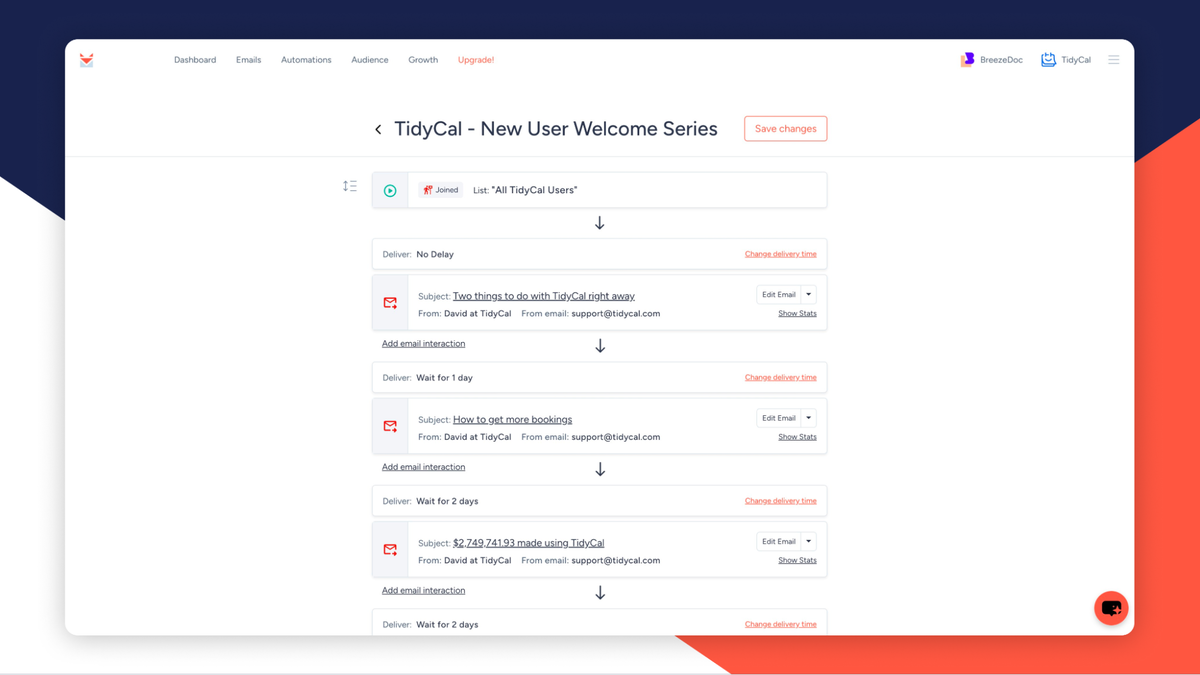
Automations in SendFox often include built-in delays to prevent spamming. These delays can slow down your email sends.
- Open your automation settings in SendFox.
- Locate the delay time between emails or steps.
- Reduce the delay to the minimum allowed, but keep some delay to avoid spam flags.
- Save changes and monitor if emails send faster.
Reducing delays helps emails reach subscribers quicker, improving campaign responsiveness.
Implementing Proper Email Warm-up To Build Sender Reputation
New SendFox accounts or those with low activity show a warming up status. This limits sending speed to protect your sender reputation.
- Start by sending emails to a small group of engaged subscribers.
- Gradually increase the number of recipients over days or weeks.
- Avoid sending large batches too quickly to prevent throttling.
- Track your sender reputation using SendFox tools or external services.
This warm-up process builds trust with email providers and improves long-term delivery speed.
Utilizing Sendfox Optimization Features To Prioritize Subscribers
SendFox offers an optimization feature that targets your most engaged subscribers first. This can speed up important email deliveries.
| Feature | Benefit |
|---|---|
| Optimized Sending | Prioritizes best subscribers for faster delivery |
| Throttled Sending | Slows sends on free plans or large lists to manage resources |
Enable optimization in your campaign settings to improve send speed and open rates.
Troubleshooting Scheduled Email Delays And Glitches
Scheduled emails may send late due to system glitches or resource limits.
- Check SendFox status pages for reported issues.
- Verify your email schedule and timezone settings.
- Reschedule stuck emails or resend manually if needed.
- Contact SendFox support for persistent glitches.
Regularly review your scheduled campaigns to avoid unexpected delays.

Credit: appsumo.com
Pricing And Affordability Of Sendfox Plans In Relation To Sending Speed
SendFox offers plans that differ in price and email sending speed. The sending rate is a key factor for many users. Free plans have slower sending rates due to system resource limits. Paid plans provide faster delivery, reducing wait times for email campaigns.
Understanding the balance between cost and sending speed helps users choose the best plan. This section breaks down how pricing affects sending rates and value.
Comparison Of Free Vs Paid Plans And Their Email Sending Rates
The free plan has a throttled sending speed. This means emails send slower, depending on current system load. Users may notice delays during busy times.
Paid plans offer optimized sending speeds and priority in the sending queue. This leads to faster email delivery, especially for large lists.
| Plan | Sending Speed | Key Features | Price |
|---|---|---|---|
| Free | Slow, throttled | Basic sending, limited priority | $0 |
| Paid | Faster, optimized | Priority sending, automation | Varies (starting from $49/month) |
Value Analysis: Is Upgrading Worth It For Faster Email Delivery?
Upgrading improves sending speed and reliability. Emails reach inboxes faster, reducing delays in campaigns.
Faster delivery can boost engagement and open rates. This benefit matters most for time-sensitive campaigns.
Consider how critical quick sending is for your goals. If speed impacts your marketing success, upgrading adds clear value.
Cost-benefit Considerations For Small Businesses And Marketers
- Small businesses with smaller lists might manage with the free plan despite slower sending.
- Marketers with larger lists or frequent campaigns benefit from paid plans.
- Paid plans reduce waiting time, saving effort and improving workflow.
- Budget constraints must be weighed against the advantages of faster email delivery.
Choosing the right plan depends on your sending volume and urgency. The trade-off between cost and speed is key for effective email marketing.
Pros And Cons Of Sendfox Based On Email Sending Performance
SendFox is a popular email marketing tool known for its simplicity and affordability. Its email sending performance, however, has both strengths and weaknesses. Understanding these helps users decide if SendFox fits their needs, especially in terms of email delivery speed and reliability. Below, we explore key advantages and drawbacks related to SendFox’s sending speed, plus how support resources help manage these issues.
Advantages Of Using Sendfox Despite Sending Speed Limitations
SendFox offers several benefits that make it attractive, even with some sending speed limits.
- Cost-effective: SendFox provides a free plan with basic features ideal for beginners.
- User-friendly interface: The platform is easy to navigate, requiring little technical skill.
- Automation tools: Users can set up simple email sequences and campaigns efficiently.
- Subscriber optimization: SendFox sends emails to the most engaged contacts first, improving open rates.
- Good deliverability: Despite slower sending, emails generally reach recipients’ inboxes.
These benefits make SendFox suitable for small businesses and content creators needing straightforward email marketing.
Drawbacks And User-reported Issues With Slow Email Delivery
Many users report slow email sending as a notable drawback of SendFox.
| Issue | Description | Impact |
|---|---|---|
| Throttled sending on free plan | Emails are sent at a slower rate depending on system resources. | Delays in reaching subscribers, affecting timely campaigns. |
| Warming up period | New accounts face a warm-up phase where sending speed is limited. | Initial email blasts take longer to send, slowing campaign start. |
| System glitches | Occasional bugs cause delayed or incomplete email sends. | Unreliable delivery timing and potential missed recipients. |
These issues often frustrate users who expect faster bulk email delivery.
How Support And Community Resources Address Sending Concerns
SendFox provides several support channels and community resources to help users manage sending speed issues.
- Help Center FAQs: Detailed articles explain terms like “throttled” and “warming up.”
- Customer Support: Direct assistance helps troubleshoot account-specific delays.
- Community Forums: Users share tips and solutions for optimizing sending performance.
- Updates and Fixes: The SendFox team actively resolves system glitches and improves platform stability.
These resources assist users in understanding limitations and applying best practices to improve email delivery speed.
Recommendations For Ideal Users And Scenarios For Sendfox
SendFox suits users who need a simple, budget-friendly email marketing tool. It works well for small businesses, solo entrepreneurs, and content creators. The platform focuses on ease of use and affordability rather than ultra-fast sending speeds.
Understanding SendFox’s strengths helps users match it to the right email campaign needs. Its sending speed can be slower, especially on the free plan. Knowing who benefits most and when to optimize sending can improve results.
Who Should Consider Using Sendfox For Their Email Campaigns
- Small businesses with limited budgets needing basic email marketing.
- Content creators like bloggers and podcasters sending regular updates.
- Entrepreneurs building email lists without complex automation.
- Users new to email marketing who want an easy-to-use platform.
- Those prioritizing cost over sending speed, especially on the free or low-tier plans.
Best Practices To Maximize Sendfox’s Sending Speed And Efficiency
- Upgrade from the free plan to reduce throttling and speed up sending.
- Segment your email list to send smaller batches rather than large blasts.
- Schedule emails during off-peak times to avoid system congestion.
- Avoid sending very large campaigns at once to reduce warming up delays.
- Use the “Optimized” sending feature to target your most engaged subscribers first.
- Regularly clean your email list to keep engagement high and reduce bounces.
Alternatives To Consider When Fast Email Sending Is Critical
| Platform | Key Strength | Best For | Sending Speed | Pricing |
|---|---|---|---|---|
| Mailchimp | Advanced features and fast delivery | Growing businesses needing automation | High-speed sending with minimal delays | Free tier, paid plans start at $13/month |
| ConvertKit | Creator-focused with automation | Content creators and marketers | Quick email dispatch and list management | Starts at $15/month |
| Sendinblue | Fast sending with SMS options | Businesses needing multichannel marketing | Very fast, with daily sending limits | Free tier available, paid plans from $25/month |
SendFox is best when sending speed is not the top priority. For urgent campaigns or large lists, consider these alternatives.
Conclusion: Mastering Sendfox To Overcome Slow Sending Challenges
SendFox is a powerful tool for email marketing but users often face slow sending issues. Understanding how to manage and fix these delays improves campaign success. Proper handling of slow sending boosts engagement and keeps your audience connected. Follow key fixes and best practices to ensure smooth email delivery. Consistent monitoring and optimization help maintain SendFox’s performance. Use these insights to enhance your email marketing efforts effectively.
Summary Of Key Fixes And Best Practices
- Recognize Plan Limits: Free SendFox plans have throttled sending speeds. This slows email dispatch based on system load.
- Account Warming Up: New accounts or large sends trigger a “warming up” phase, causing initial delays.
- Optimize Recipient Lists: Send emails to engaged subscribers first to improve delivery speed and open rates.
- Check Scheduled Sends: System glitches can delay or partially send emails; reschedule if delays occur.
- Adjust Automation Delays: Customize delay times within automation workflows to manage pacing effectively.
| Issue | Cause | Fix |
|---|---|---|
| Slow sending on free plan | Throttled sending by SendFox system | Upgrade plan or space out sends |
| Email delay during initial sends | Account warming up process | Wait for warm-up completion |
| Emails not sent to all contacts | System glitch or scheduling error | Reschedule emails and monitor status |
Encouraging Consistent Monitoring And Optimization
Regularly check your SendFox dashboard for sending status updates. Watch for any throttling or delays shown in reports. Track open rates and bounce rates to spot delivery issues early. Adjust email frequency based on system performance and subscriber engagement. Test automation delays to find the best timing for your audience. Keep your contact list clean by removing inactive subscribers. These steps help maintain steady sending speeds and improve campaign results.
Final Thoughts On Leveraging Sendfox For Effective Email Marketing
SendFox delivers reliable email marketing with simple tools and clear controls. Understanding its sending limits and system behaviors reduces frustration. Patience during warming up and careful list management boost deliverability. Use monitoring insights to tweak your campaigns for better performance. Even with slow sending, SendFox supports building strong connections through email. Apply these tips to keep your messages reaching inboxes without delay.
Credit: www.poptin.com
Frequently Asked Questions
Why Are My Emails Taking So Long To Send?
Emails may take long to send due to server delays, large attachments, slow internet, or email provider throttling limits.
Who Owns Sendfox?
SendFox is owned by AppSumo, a popular platform offering lifetime deals on software tools. They developed and manage SendFox.
How Do I Transfer Emails To Sendfox?
Export your emails from your current service as a CSV file. Then, import this CSV into SendFox’s contact list section. Ensure your file matches SendFox’s format for smooth transfer.
Why Are My Sendfox Emails Sending So Slowly?
Sendfox may send emails slowly due to system throttling or account warming up. Free plans often experience slower sending rates to manage resources efficiently. Gradually building your email list and following warm-up practices can improve sending speed.
Conclusion
Slow email sending in SendFox can disrupt your marketing flow. Small delays often result from free plan limits or system throttling. Adjusting your sending schedule and upgrading plans may help speed up delivery. Keep your email list clean and avoid large sudden sends to reduce delays. Patience is key as accounts warm up with new campaigns. For reliable email marketing tools, consider exploring SendFox. Fixing slow sending issues ensures your messages reach readers on time. Stay consistent, and watch your email efforts improve steadily.